We powered up a new board, connected a scope, and saw huge oscillations everywhere. The waveforms were with different amplitudes at different points we probed, but with the same frequency. And the weird part is that when we placed a finger on some of the op amps, the oscillations changed. Sometimes their amplitude dropped, sometimes they entirely stopped. Took the finger off and they came right back.
If you have done enough analog work, you know that moment. The circuit is talking to you, you need to figure out what it says.
The Design
The board is a multi-channel sensor system. Several op amp stages spread across the PCB providing signals from different sensors. To compensate for temperature drift, a DAC generates a temperature-dependent DC calibration voltage that feeds the non-inverting inputs of all these op amps.
This means one signal, originating from a single DAC, is routed to many op amps that are physically spread across the board. Keep that in mind.
Ruling Out the Usual Suspects
The oscillations were clearly centered around the op amps. They were the strongest right at their outputs or inputs, and touching the op amp packages changed them. There’s a standard checklist we usually go through to figure out why an op amp oscillates. We went through all of it.
Capacitive loading: If the op amp output drives a capacitive load this can add a pole to the loop gain and degrade the phase margin. But the loads in this design were resistive, well within the op amp’s specifications.
Stray capacitance on the inverting input: Parasitic capacitance at the inverting pin, combined with the feedback resistor, creates a pole in the feedback loop and can cause instability. But the layout around the inverting pins was tight, nothing suspicious.
Feedback resistors that are too high: Related to the above. Very large feedback resistors make the circuit more sensitive to any stray capacitance, especially on fast speed op amps. Ours were in the low kilohm range, and bandwidth in this design was not that high. Not the issue.
Unity gain stability: Some op amps are not unity gain stable. They need a minimum gain to be stable. We checked the datasheets, these were unity gain stable parts and they also were used with gain.
Feedback network poles and zeros: If the feedback network isn’t purely resistive it can introduce poles or zeros that shift the phase at the frequency where the loop gain is crossing 0 dB. If the phase margin at that crossing is too low, you get oscillations. But that also wasn’t the case here.
Bypass capacitors: The classic one. Missing or poorly placed decoupling caps can cause the supply voltage to fluctuate under load transients, creating a feedback path through the supply pins. We had 100 nF caps close to the supply pins of every op amp. Did not seem to be the problem.
We were running out of standard explanations.
Following the Clues
So we started thinking about what the symptoms were actually telling us.
First, the oscillations were strongest near certain op amps, not all of them. Second, touching different op amps had different effects. So we started removing op amps from the PCB to isolate the problem.
When we removed a few specific op amps where the oscillations were the strongest, the oscillations stopped everywhere. But if we removed only some of them, it didn’t stop – it just changed amplitude and frequency. And some op amps didn’t seem to contribute at all and removing them didn’t change anything.
So what was clear is that it wasn’t a single op amp that was unstable on its own. If it were, removing that one amp would have killed the oscillation regardless of what else was on the board. Instead, the oscillations seemed to depend on some kind of interaction between multiple op amps.
Since we had ruled out all the obvious causes, and the behavior depended on the interaction between specific amps, we asked ourselves: what do all these op amps actually have in common? The DAC calibration signal. That single trace connecting all of them.
The Layout Told the Story
We started following the DAC output trace on the layout. It was long, because the op amps were spread across the board.
And then we saw it.
In several places, the trace ran very close to the outputs of some of the op amps. That is a positive feedback through parasitic capacitive coupling from the output to the non inverting input! A small amount of output signal leaks back to the input, gets amplified, leaks back again.
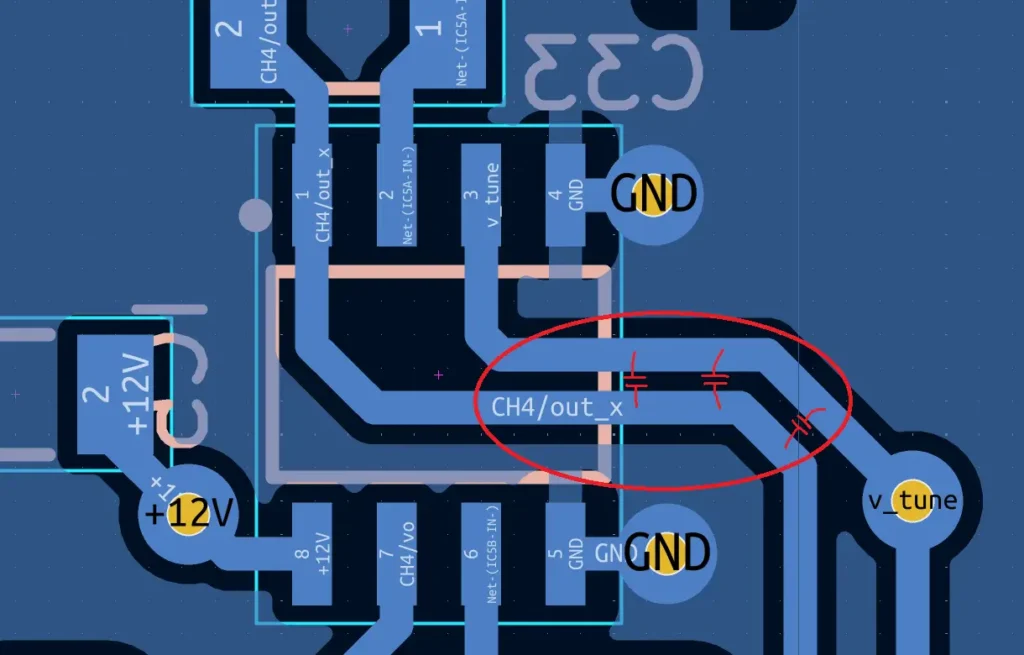
This also explained why removing specific op amps solved the oscillation. Those were the op amps whose outputs were physically closest to the shared trace. Remove enough of them and the total coupled signal drops and oscillations stop. It also explained why some amps seemed uninvolved: their outputs were routed far from the shared trace.
And it perfectly explained the finger effect. A finger on the trace or the op amp package adds capacitance to ground, attenuating the coupled signal on the shared trace.
The Fix We Were Afraid We Wouldn’t Find
Our first thought was that we need to re-spin the layout. That’s the correct fix, but it means a new board revision, new fabrication, and a huge delay.
But then we thought about the finger again. The finger helps because it adds capacitance. So what if we just add a real external capacitor?
We placed small ceramic capacitors on the non-inverting inputs of the op amps that contributed to the oscillations the most, from the input pin to ground. As long as the value of this capacitor is much higher than the parasitic coupling capacitance from the output, it will fix the oscillations. 1 nF is good enough and it does not affect the circuit’s operation otherwise.
We soldered the caps, powered up, and the oscillations were completely gone. Stable outputs, clean waveforms, and a finger on the op amp no longer changed anything.
What We Learned
Some things you can only learn by experiencing them. We knew about capacitive coupling in theory, but we never considered it as a real threat during routing until we spent days debugging this. Now we have.
If you have a shared signal feeding the inputs of multiple op amps: a reference, a bias, a calibration voltage, consider adding a small capacitor on each of their inputs to ground, even if nothing seems wrong. If the application allows it, it’s cheap insurance against coupling you might not see coming. This is now permanently on our layout review checklist.
Have you ever tracked down a stability issue that turned out to be something completely unexpected? We’d love to hear your war stories, drop a comment and let’s compare notes.