Have you dedicated weeks to a PCB design only to face a costly redesign because of a schematic error you missed? You’re not alone. Unfortunately, most of hardware designs require at least one respin before production. Each respin can cost thousands of dollars, delay timelines by weeks or months, and put enormous pressure on both engineers and businesses.
In software, AI-powered tools like GitHub Copilot and Cursor AI have already become the standard tools for catching bugs or even writing code. But hardware? We’ve lagged behind, dealing with the complexities of physical systems where every overlooked resistor, misapplied IC pin, or unstable op-amp feedback loop can ripple into disaster.
That’s why we have launched a new service: an AI schematic review tool that analyzes your designs and catches mistakes early, before they turn into expensive respins.
This blog post will walk you through why AI in schematic review matters, how our tool works, and what kinds of errors it can find. We will also cover common design mistakes, tips for improving results quality, and the future of AI in hardware engineering.
Why AI is Revolutionizing Schematic Reviews (But Not Replacing Engineers)
When you hear “AI in engineering,” you might think of flashy headlines about chips designed by machines or fully automated design pipelines. But let’s take a step back.
The Software vs. Hardware Gap
In software engineering, AI tools are already quite mature. Automated code review assistants detect bugs, enforce style guides, suggest optimizations, and even writing the code. This works because code is a language, similar to any other text, and LLMs (large language models) are quite good with texts. AI can learn patterns and apply them directly.
In hardware design, things are trickier. Electronics involves physics, materials, and real-world tolerances. AI still can’t replace SPICE simulations or signal-integrity analysis. What it can do, however, is excel at pattern recognition and checklist-based review, exactly the kind of tasks that make schematic review tedious and error-prone.
How AI Schematic Review Tools Add Value
Here’s the key: AI schematic review is not about replacing engineers. It’s about giving you a assistant that never gets tired, doesn’t zone out after hours of staring at nets, and has a checklist of best practices longer than most textbooks.
Benefits include:
- Reduced respins: Catch design flaws early and cut down manufacturing delays.
- Faster reviews: A 10-minute AI review beats weeks lost to debugging hardware.
- Broader coverage: Checks logical errors, datasheet compliance, reliability and best design practices.
Meet the Tool: AI-Powered Analysis for Smarter Designs
So what exactly does our AI schematic review tool do?
The Workflow
- Select your EDA tool: Currently, we support KiCad, OrCAD, and Altium, with more tools coming soon.
- Upload your files: Provide PDF schematic, netlist and Bill of Materials. Make sure the netlist is in the specified format.
- AI kicks in:
- A vision model analyzes the schematic PDF.
- An LLM analyzes the netlist.
- Both are cross-referenced against each other via a proprietary checklist of best practices and common errors.
- Analysis time: Small schematics take 5–10 minutes, larger ones can take 30+ minutes.
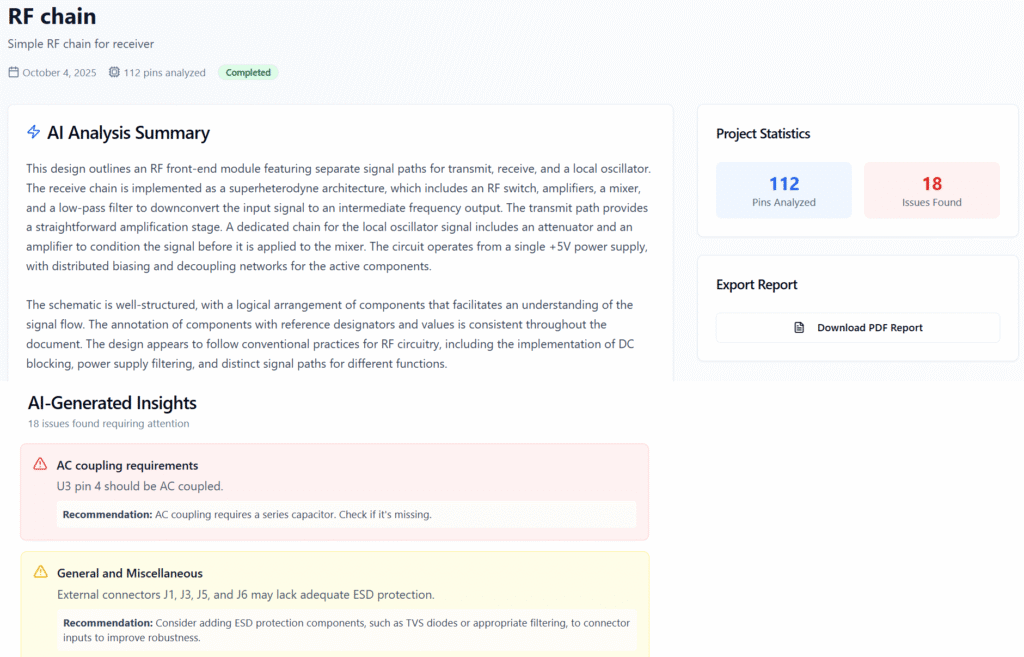
Behind the scenes, the AI breaks down your schematic into smaller, more manageable pieces. Although it still can’t run SPICE simulations, it can find non-trivial design mistakes by analyzing each of the sub-circuits using thinking models, even doing simple math where needed. It can find common pitfalls like incorrect IC usage, missing biasing, unstable feedback networks, datasheet non-compliance, logical flaws and more. Over time, the system improves as it “learns” from real-world schematics and the AI models are constantly improving.
Pros and Cons
Like any engineering tool, it has strengths and limits.
Pros:
- Convenient: just a few clicks to start.
- Finds errors that even experienced engineers can miss.
- Goes deeper than DRC by analyzing logic and best practices.
Cons:
- Can miss issues or raise false positives.
- It is not a substitute for human expertise, it is more of a supplement.
Think of it like this: If a peer review is a conversation with a colleague, this AI is your ultra-detailed checklist assistant, tirelessly scanning every line for oversights.
Pro Tips: How to Get a More Accurate Schematic Review?
The AI works best when your schematics are clean and complete. Here are some best practices to maximize accuracy:
- Keep schematics well-organized, partitioned into functional sub-units.
- Ensure good resolution on the PDF.
- Avoid overlapping text or symbols in your schematics.
- Export the PDF file of your schematic with white or light color background, no grid lines, and with a normal reading orientation.
- Use descriptive net names in your design.
- Add and fill important component fields in your EDA software (footprint, manufacturer part number, value, description).
- Add a short and clear circuit description in the project setup page. Note any important details such as input/output interface, voltages and currents, and the application of the PCB.
Remember that the AI can’t guess information that you did not provide anywhere. If for example you use 10 uF capacitor in your design, but there is no description field, nor manufacturer part number – the tool will not be able to tell if it is a 10 V rated capacitor or 16 V.
Ready to Level Up Your Designs?
At BV Circuits, our mission is to help engineers design smarter, not harder. Our AI schematic review tool is here to cut down respins, catch sneaky mistakes, and give you confidence before manufacturing.
You can test our tool for free, just upload your schematic, run a review, and see what insights emerge. For the free analysis you will only see couple of issues unlocked, but it is usually enough to get a feel for the capabilities. So why not give it a try on your next project?
We would love to hear your feedback! Just leave a comment below, or reach us at info@bvcircuits.com.
Share this on:
This looks really interesting. Do you have any data or experience you can share on how accurate the AI’s schematic reviews are in practice?
It really depends on the schematic itself and on how “accuracy” is defined. In a typical report, out of 10 issues, there are usually 1-2 critical findings that can potentially save the design from a costly mistake (although not all designs contain critical errors, of course). There are typically 2-4 reliability improvement suggestions, as well as another 2-4 thoughtful suggestions or potential issues. Occasionally, there may be 1-2 incorrect points, such as false positives or debatable interpretations, but fully fabricated issues (pure AI hallucinations) are rare.
Accuracy can often be improved on the user side: well-organized, clear, and informative schematics tend to produce better results, especially when the guidelines in this post are followed. We’re also continuously improving the reliability of the tool, so this answer reflects its current state.